

View on GitHub
Open this notebook in GitHub to run it yourself
Execution Tutorial
- Part 2
Expectation Values and Parameterized Quantum Programs
This tutorial covers the basics of measuring observables expressed as linear combinations of Pauli strings and executing a parameterized quantum program using Classiq via Python SDK. Alternatively, you can use the Classiq IDE web page to execute quantum algorithms. A parameterized quantum program is a quantum circuit with adjustable parameters, such as angles in rotation gates, that can be tuned to alter the circuit’s behavior. Think of it like tuning a camera with adjustable settings: the camera (the circuit) stays the same, but adjusting the settings (parameters) changes the captured images (outputs). In quantum computing, tuning these parameters helps identify the configuration that yields the most useful results. These programs are particularly useful in quantum machine learning and optimization, where the goal is to find the best parameter set. First, we create a parameterized quantum program using two qubits. The program applies an X gate, a parameterized RY rotation, and a CX gate. The rotation angle is controlled by a variable calledangle.
Output:
Output:
ExecutionSession, it is possible to show the counts for this particular parameter value:
Output:
angle from to .
batch_sample is a list of results, one for each angle value.
Therefore, we can analyze the data from each parameter on angles_list.
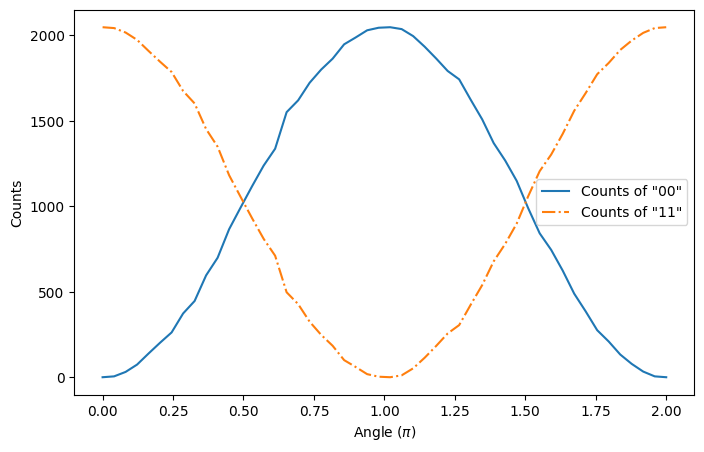
For example, an interesting way of analyzing this data is to plot the number of counts of the states and as functions of angle:
Measuring Pauli Strings
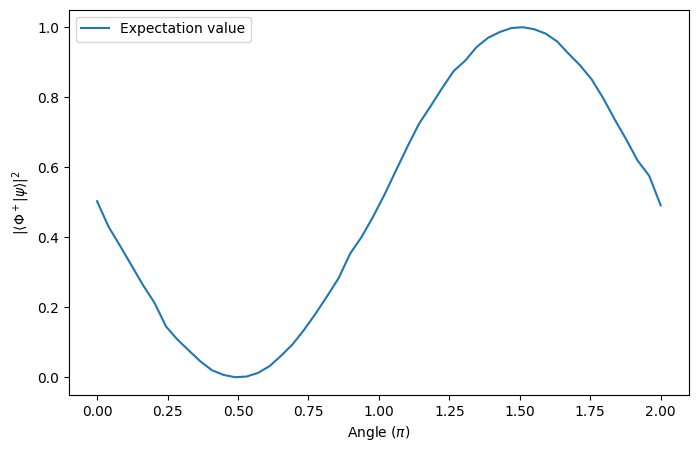
Measuring observables from a quantum program turns out to be necessary when you want to obtain information that can’t be accessed only from the populations of states. For this end, you can measure Pauli Strings using Classiq. As an example, if we want to measure how close the output of our system is to the Bell state: it is possible measure the expected value of its projection: The projector operator, by its turn, can be represented as a Pauli string: Therefore, if we want to measure the projector expected value for some output of the quantum circuit, say angle , it is possible usingestimate and ExecutionSession.
For this, first we need to define the Hamiltonian to be measured:
ExecutionSession, evaluate the expected value of the output:
Output:
Retrieving Jobs Executed Using Execution Session
When executing a job that may take longer, or is on queue with other jobs on a hardware backend, it is interesting to have a way of retrieving this job in case it takes too long to execute. For this, it is possible to submit anExecutionJob - which is associated to an ID - and retrieve its results later. To do so, it is only necessary to add the prefix submit to its original functions. As an example, we can submit two different jobs and retrieve its outputs by using its ID.
For this, first we need to submit them:
ExecutionJob.
For example, here we retrieve a previously execution of estimate_job and compare it to the outputs of first_sample - they should be close:
Output:
Application: Variational Quantum Circuit to Prepare a Bell State
In this additional session, we create a simple parameterized quantum algorithm that prepares the Bell State . For this, an ansatz with two parameters is constructed:projector_operator. Therefore, we create a negative_coeffs_projector_operator to minimize:
minimize method from ExecutionSession will be employed.
Output: